
Plan your spending, keep bills organized, and track savings throughout the year.
Bring your budget, everyday spending, bills, debt payments, and savings goals together in one organized planner.
The Complete Budget & Savings Planner combines editable spreadsheets, printable planning pages, and clear instructions to help you build a budgeting routine you can follow throughout the year.
Plan what you expect to spend, record what actually happens, and review where adjustments could help. Whether you are managing your own finances or planning with your household, you will have a consistent place to keep the numbers that matter.
See Where Your Money Is Going
Receipts, upcoming payments, and savings plans are easier to work with when they are organized together.
The workbook includes a central transaction log with 3,000 prepared rows. Enter your transactions, select the appropriate category code, and let the formulas update your monthly and annual results. When an entry relates to a savings goal, bill, or debt, add its corresponding code to connect it to that tracker.
The Monthly Dashboard helps you compare:
- Planned and actual income.
- Expenses, including bills and debt payments.
- Savings contributions and withdrawals.
- Spending differences by category.
- Money remaining to allocate, or a clearly labeled shortfall.
Your results reflect the information you enter. “Money remaining” is a budgeting calculation, not a verified bank account balance.
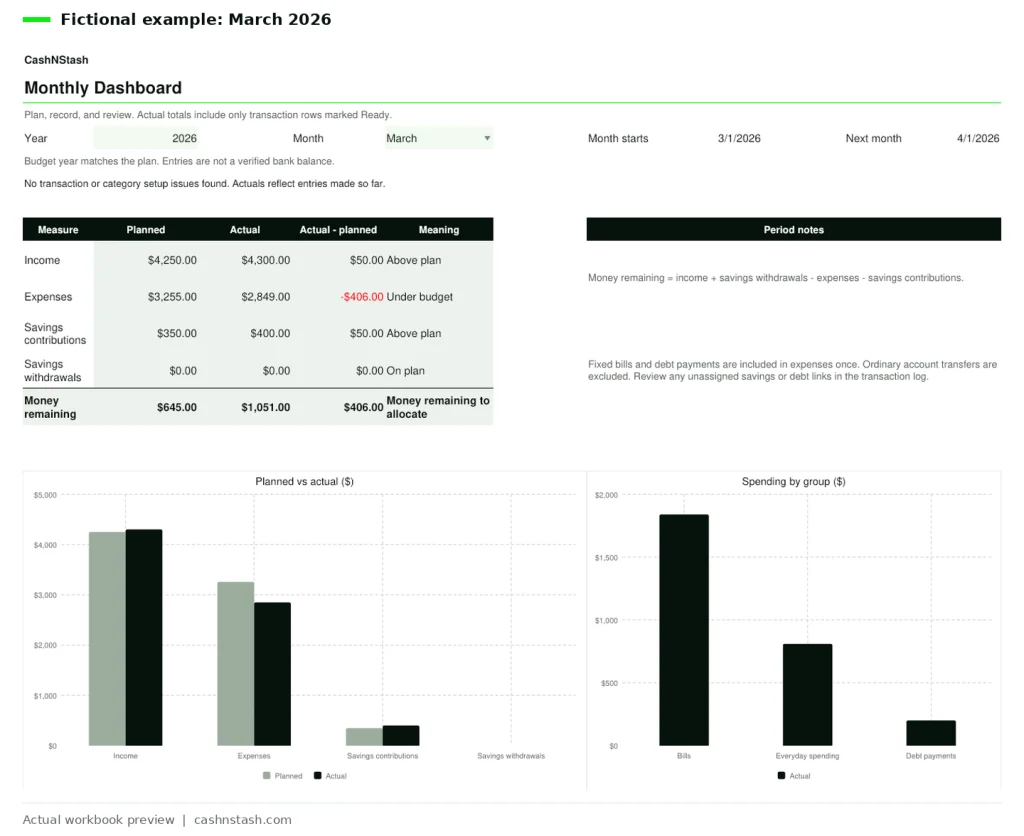
Fictional March 2026 example showing $4,300 in income, $2,849 in expenses, $400 in savings contributions, and $1,051 remaining.
Nine Worksheets for Your Budgeting Routine
Each worksheet has a specific purpose, with connected calculations that help you review your finances without rebuilding category totals by hand.
| Worksheet | What it helps you do |
|---|---|
| Start Here | Follow the instructions and understand how the planner works. |
| Setup | Customize category names, choose your planning year, and keep monthly goals and reflections. |
| Budget Plan | Plan income, spending, and savings separately for all 12 months. |
| Transactions | Record activity in one central log with 3,000 prepared rows. |
| Monthly Dashboard | Compare your plan with recorded results using summaries, category differences, and charts. |
| Annual Overview | Review monthly results together and compare annual plans with recorded activity. |
| Bills & Subscriptions | Organize up to 24 bills and review linked payment status. |
| Savings Goals | Track up to 12 goals or sinking funds. |
| Debt Tracker | Organize up to 12 debts, statement balances, and recorded payments. |
Switching the dashboard month preserves the plans you entered for other months, making it easier to review the year as it develops.
Give Your Savings Goals a Clear Plan
Keep your emergency fund, vacation savings, car maintenance reserve, and other goals visible alongside your everyday budget.
For each savings goal, enter a target, opening savings, and relevant dates. The tracker shows linked contributions and withdrawals, current savings, the amount still needed, progress, and an estimated monthly contribution toward your deadline.
A contribution linked to a goal updates both its savings tracker and the relevant budget totals. Opening savings stays separate from new contributions.
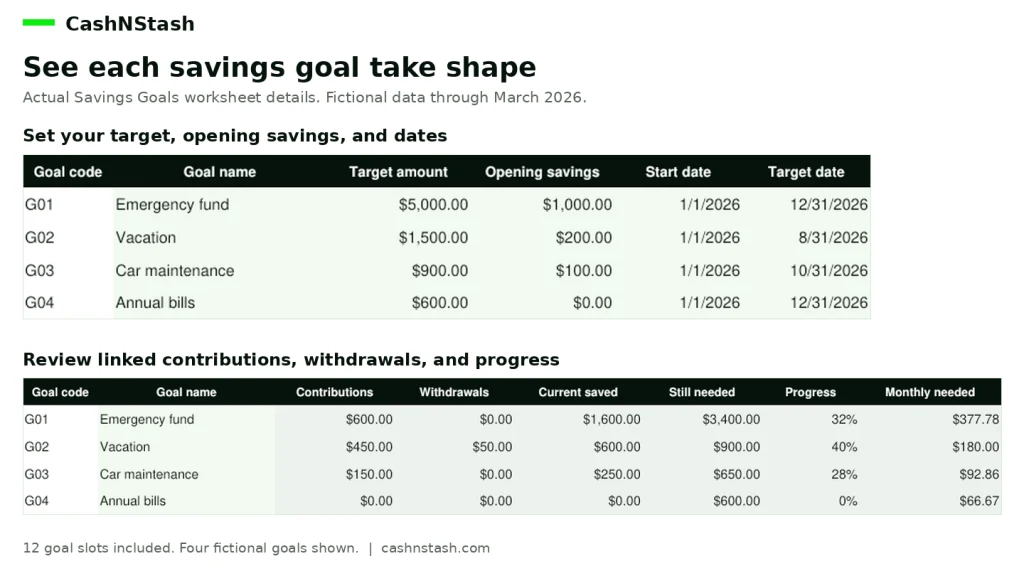
Fictional example: the emergency fund has $1,600 saved toward a $5,000 target, showing 32% progress.
The bill schedule also helps you review expected costs and linked payments. Debt tracking brings statement balances, APRs, minimum payments, due dates, and payment records together. You update balances from your statements, allowing the tracker to reflect changes that payments alone cannot explain.
Use the Workbook or Plan on Paper
Choose the format that fits your routine.
The editable workbook calculates results from your entries. Pale green input cells and clearly distinguished calculated cells help you see where to work.
The eight-page printable PDF pack gives you blank pages for monthly planning, an annual overview, bills, savings goals, debt tracking, transaction recording, and reflection.
Use the printable pages independently or alongside your spreadsheet. Handwritten entries remain on paper and do not automatically synchronize with the workbook.
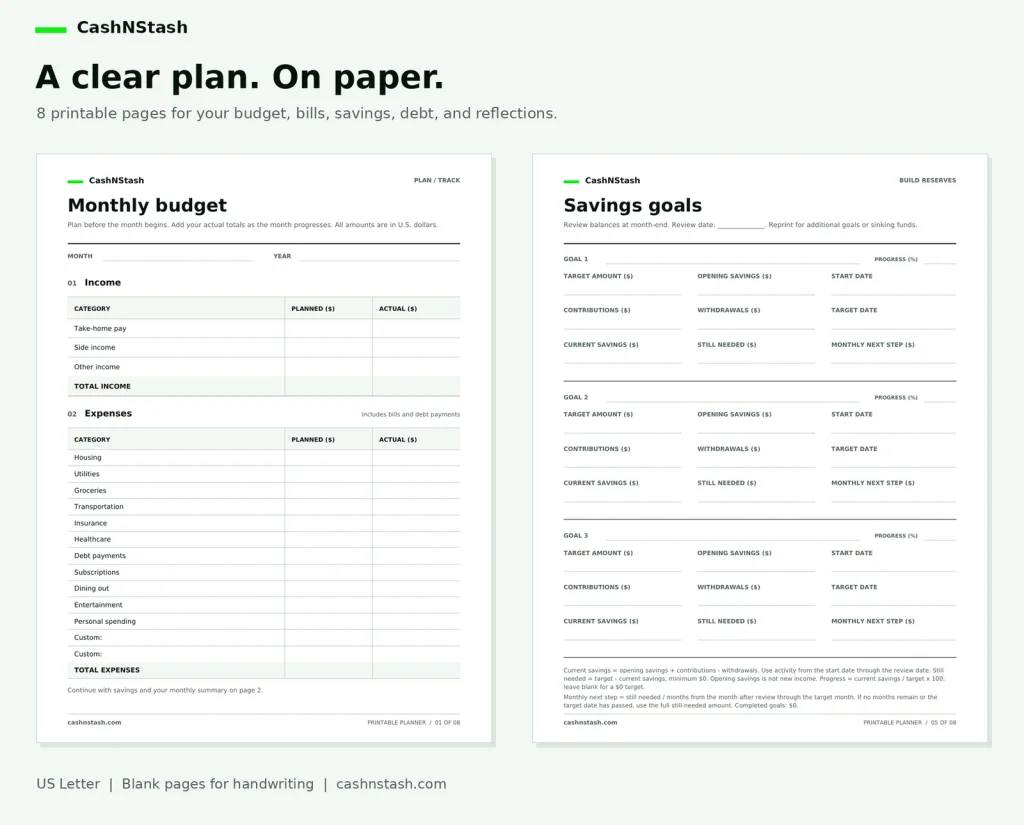
Two pages from the included US Letter printable pack.
Get Started in Four Steps
- Customize your setup. Choose your planning year and adapt the category names to your household.
- Plan the month. Enter expected income, expenses, and savings amounts.
- Record transactions. Add activity throughout the month and link relevant entries to their trackers.
- Review and adjust. Check your dashboard, review outstanding items, and record your monthly reflection.
The separate example workbook contains fictional transactions covering January through March 2026, so you can see how the planner works before entering your own information.
Ready to Build on Your Free Monthly Planner?
The free CashNStash Monthly Budget Planner provides a focused starting point for planning one month.
The Complete Budget & Savings Planner adds ongoing transaction records, connected trackers, and a view of the full year. It suits beginners and intermediate budgeters who want more detail and are comfortable recording their activity manually.
You can use it individually, plan with your household, or print the pages for regular budget check-ins.
Everything Included in Your Download
Your organized ZIP includes:
- A blank Excel workbook with all nine worksheets.
- A separate workbook with three months of fictional examples.
- An eight-page blank printable planner PDF.
- A seven-page Quick Start PDF.
- A personal-use license covering your household.
- Three product preview images.
Frequently Asked Questions
What exactly will I receive?
You will receive downloadable spreadsheet and PDF files, instructions, a household-use license, and preview images, packaged together in one ZIP file.
Is this a physical product?
No. This is a digital download. Nothing will be shipped.
Do I need budgeting experience?
No previous budgeting experience is required. The instructions, familiar household categories, and example workbook help you get started. You enter your information into the designated cells, and the workbook’s formulas calculate the results.
Can I use it in Microsoft Excel or Google Sheets?
The workbook is designed with standard formulas for Excel and Google Sheets import. The Quick Start guide explains opening the .xlsx file in Excel and importing it into Google Sheets.
Calculation checks were completed in LibreOffice. Direct testing in Microsoft Excel and Google Sheets, including dropdown behavior and chart appearance after import, has not been completed. Visual differences may occur.
Does it connect to my bank?
No. This is a manual-entry planner. You enter transactions and update information yourself. It does not import bank activity, send bill reminders, or make payments.
Can I customize the categories?
Yes. You can rename categories in Setup. Keep the assigned codes and existing classifications consistent, following the guide, so historical entries remain connected.
Can I use it again next year?
Yes. Archive your completed workbook, start a fresh blank copy, and carry forward the relevant opening balances. The Quick Start guide explains the process.
Can I print the planning pages?
Yes. The PDF pack uses US Letter pages and is designed for handwriting. Print the pages you need, including additional copies for your household.
Can my household use the same purchase?
Yes. The personal-use license allows your household to use, customize, back up, and print the files. Redistribution, resale, and public sharing of the templates are prohibited.
Start Your Next Month With a Clearer Plan
Give your spending, upcoming bills, and savings goals a consistent place in your routine.
Get the CashNStash Complete Budget & Savings Planner and start building a budget you can return to, review, and adjust throughout the year.